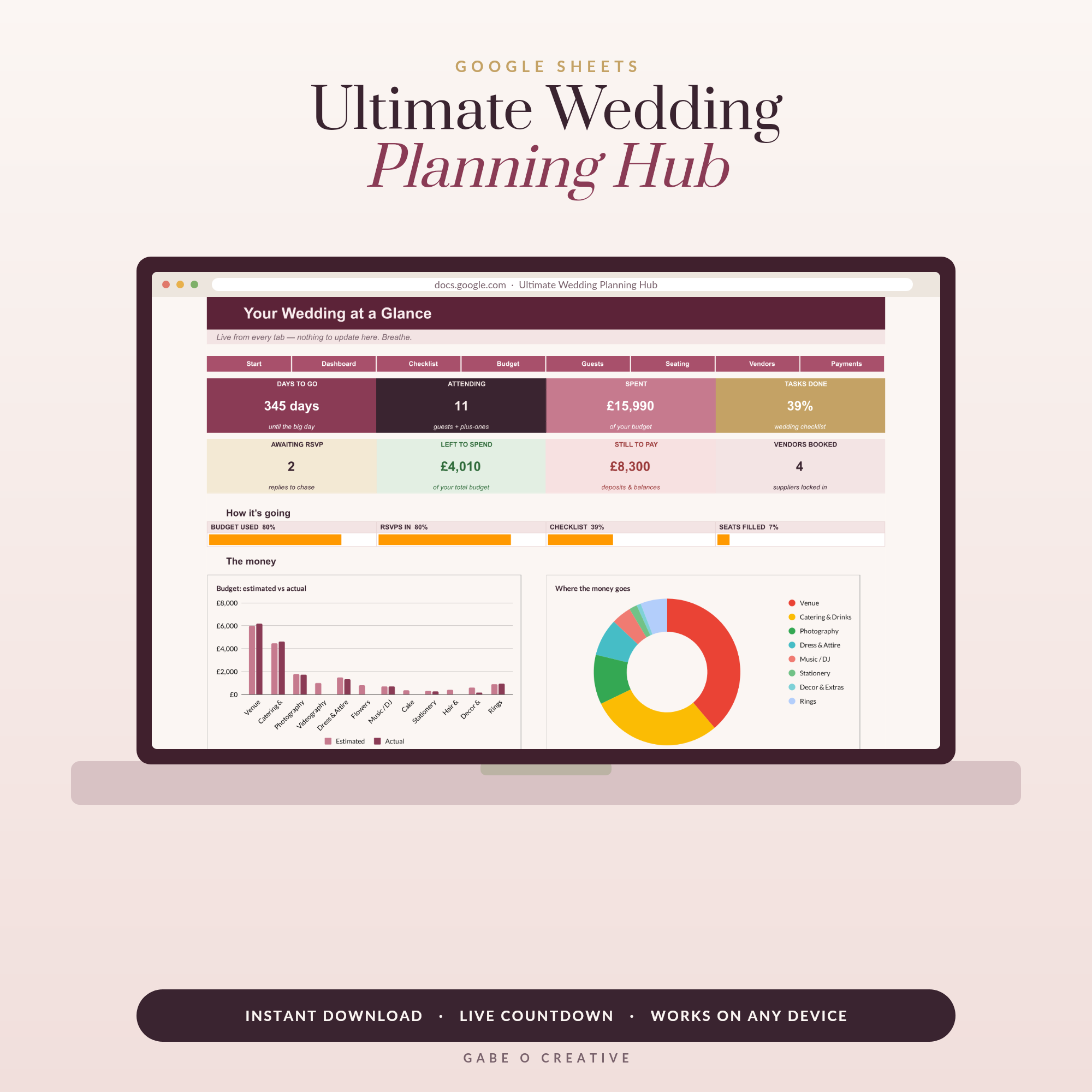
Somewhere between the third Pinterest board and the second venue viewing, every couple discovers the same thing: weddings are a project, and projects need a system. A wedding planning spreadsheet is that system — budget, guest list, vendors, timeline and seating in one place that both of you can edit from your phones. It's exactly what our Ultimate Wedding Planning Hub gives you in Google Sheets, fully built and ready the moment you open it.
Skip the setup weekend: the Ultimate Wedding Planning Hub arrives with every tab, formula and RSVP counter already working — make a copy and start planning tonight.
Why a spreadsheet beats binders and apps
The binder is romantic until you leave it at home during a venue visit. The apps are slick until they start emailing you sponsored vendors, or the free tier ends. A Google Sheets wedding planner sidesteps all of it:
It's always with you — any phone, tablet or laptop, updated live. It's collaborative — you and your partner (and mum, if you dare) edit the same sheet at the same time, so there is one version of the truth. It does the maths — deposits, balances and totals update themselves, so 'can we afford the good photographer?' takes five seconds to answer. And it's yours forever — no subscription, no account shutdown two months before the day.
 Shop Wedding Budget Planner →
The seven tabs that cover the whole wedding
After the budget breakdown below, this is the structure to copy. Seven tabs, no more:
1. Dashboard — countdown to the day, budget headline (spent vs remaining), RSVP tally, next three deadlines. One glance, whole wedding.
2. Budget — every category with estimated, actual, paid and balance columns (more below).
3. Guest list — names grouped by household, invitation sent, RSVP status, meal choice, dietary notes, thank-you-card sent.
4. Vendors — shortlists with quotes side by side, then contact details, deposit dates and final-payment dates for the winners.
5. Checklist — month-by-month tasks from '12 months: book venue' to 'week of: confirm final numbers with caterer'.
6. Day-of timeline — from hair and make-up to the last dance, with who-needs-to-be-where.
7. Seating chart — tables as columns, guests dragged in once the RSVPs land.
That's the exact architecture of the Ultimate Wedding Planning Hub — plus automatic counters so the dashboard updates itself as you tick things off.
The budget tab: where spreadsheets earn their keep
Wedding budgets don't blow up because couples are careless — they blow up because costs live in seventeen places: a deposit here, a quote in an email, a 'roughly £300' in someone's head. Put them in one table and the truth appears instantly.
Typical UK budget shares look roughly like this — use them to sense-check your own estimates:
| Category | Typical share | On a £15,000 budget |
|---|---|---|
| Venue & catering | 45–50% | £6,750–£7,500 |
| Photography & video | 10–12% | £1,500–£1,800 |
| Attire, hair & beauty | 8–10% | £1,200–£1,500 |
| Flowers & décor | 8–10% | £1,200–£1,500 |
| Music & entertainment | 5–8% | £750–£1,200 |
| Stationery, rings, extras | 8–10% | £1,200–£1,500 |
| Contingency | 5–10% | £750–£1,500 |
Two rules make the tab work. First, enter every cost the day you learn it — a quote is a cost the moment you're seriously considering it. Second, never delete the contingency line. Something will run over; the contingency is what keeps it from becoming a crisis. For the full method, our wedding budget guide walks through it line by line, and if you prefer paper for the early daydreaming stage there's a printable budget planner too.
 Shop Wedding Guest List & RSVP →
Guest list and RSVPs: the tab you'll open most
The guest list drives everything — catering numbers, venue capacity, stationery counts, seating. Build it by household, not individual (one row per invitation), and give every row an RSVP status dropdown: invited, attending, declined, no reply. A simple counter at the top then answers the question you'll be asked weekly: 'how many are we?'
Add columns for meal choice and dietary notes as replies arrive, and a final 'thank-you sent' checkbox for after the day — future you, facing a stack of cards, will be grateful. Our guest list guide covers the etiquette wrinkles (plus-ones, children, the B-list question), and the Hub's guest tab counts attending, declined and outstanding automatically.
Vendors and the timeline: the last two pieces
Use the vendor tab twice. In the shortlist phase, list rival quotes side by side — same columns, honest comparison, no 'I think the second photographer was cheaper?' debates. Once you've booked, the same tab becomes your contacts-and-payments sheet: deposit paid, balance due date, arrival time on the day. Every vendor phone number in one place is worth its weight in gold at 8am on the morning itself.
The day-of timeline deserves its own care — it's the sheet your bridal party will actually use. Work backwards from the ceremony time, pad everything by fifteen minutes, and share it the week before. Our wedding day timeline guide has a proven schedule to copy, and there's a printable version for taping to the mirror.
Set it up once, then let it carry you
A wedding planning spreadsheet isn't about being a 'spreadsheet person'. It's about making one decision — where wedding information lives — so the other five hundred decisions get easier. Set up the seven tabs this weekend, or make a copy of the Ultimate Wedding Planning Hub and have it done in five minutes. Pair it with the wedding printables bundle for the paper moments — signs, timeline cards, the day-of details — and with our 12-month checklist so you always know what this month's three tasks are. If you fall in love with planning in Sheets, the Complete Collection puts a dashboard behind the rest of life too.
 Shop Wedding Day Timeline →
Frequently asked questions
Why use a spreadsheet instead of a wedding planning app?
Apps lock your plans behind an account, push adverts for their vendor partners, and often charge monthly. A spreadsheet is yours forever, works on any device, lets both partners edit at once, and does the budget maths transparently — you can see every formula rather than trusting a black box.
What tabs should a wedding planning spreadsheet have?
Seven cover almost everything: a dashboard (countdown and headline numbers), budget tracker, guest list with RSVP status, vendor comparison and contacts, month-by-month checklist, wedding-day timeline, and a seating chart. Anything else — honeymoon, hen do — can be extra rows, not extra systems.
How do I make a wedding budget in Google Sheets?
List every category (venue, catering, attire, flowers, photography, music, stationery, rings, extras), give each an estimated cost, then track actual quotes and deposits against it. The key columns are estimated, actual, paid so far, and balance due — with dates so you can see cash flow before the final month.
Can my partner and I edit the same wedding spreadsheet?
Yes — that's one of the biggest advantages of Google Sheets over a binder or a desktop file. Share it once and you can both update it live from separate phones or laptops, whether you're at a venue viewing or texting the caterer. No emailing versions back and forth.
How far in advance should I start the spreadsheet?
The day you start talking real numbers. Most couples set it up 10–14 months out, because venues and photographers book earliest and eat the biggest share of the budget. Starting the sheet before you book anything means every deposit lands in a system instead of a scribbled note.
Is a pre-built wedding spreadsheet worth it versus DIY?
If you enjoy building spreadsheets, DIY is free — budget a weekend for formulas, dropdowns and formatting. A pre-built template costs less than a single boutonnière and arrives with the RSVP counters, budget maths and timeline already wired together, so you start planning in minutes instead.
Plan the wedding, not the spreadsheet: grab the Ultimate Wedding Planning Hub, make your copy, and have every tab working before the kettle boils.